
AI Agent Studio in the Real World
Oracle Moved the Furniture. You Probably Don’t Need to Rebuild the House.
What changed in Oracle AI Agent Studio from 26C onwards, and what it means for existing AI developments
If you've opened Oracle AI Agent Studio since the 26C update and found yourself hunting for things you used last quarter, you're not alone. The screens changed, the menus moved, and some familiar capabilities now appear in a different shape.
Those changes do not automatically mean that existing AI work is wasted or needs to be rebuilt. But if you have agents live, in testing or in development on Oracle Fusion, it's worth understanding what changed before anyone suggests starting again.
26C was more than a visual refresh
Oracle's 26C release notes describe a new AI Agent Studio experience: a modern design, simplified navigation, visual builders for workflows and agentic applications, a natural-language Builder Assistant, debugging tools, policy models, approvals, connectors and a command line interface.
The first thing most people notice is the reorganised navigation. The Studio now separates areas such as Applications, Workflows, Resources, Connectors, Policy Models and Approvals.
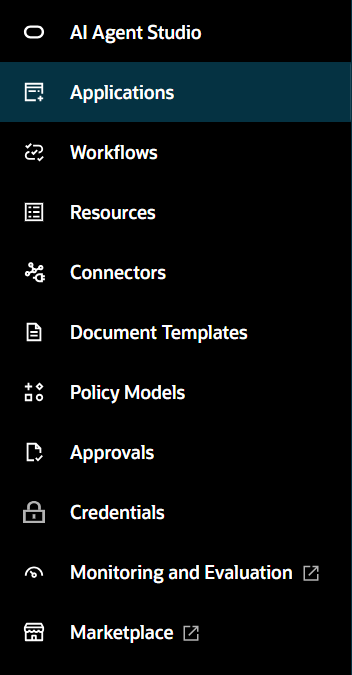
That alone explains a lot of "where has it gone?" moments. Guides, screenshots and training material written before 26C may no longer match what users see.
A broader delivery model, not a replacement
The bigger story is direction. Oracle has broadened how AI is delivered in Fusion: from individual agents, to workflow agents that coordinate defined steps, to agentic applications that bring agents, workflows, controls and a user experience together around a business outcome.
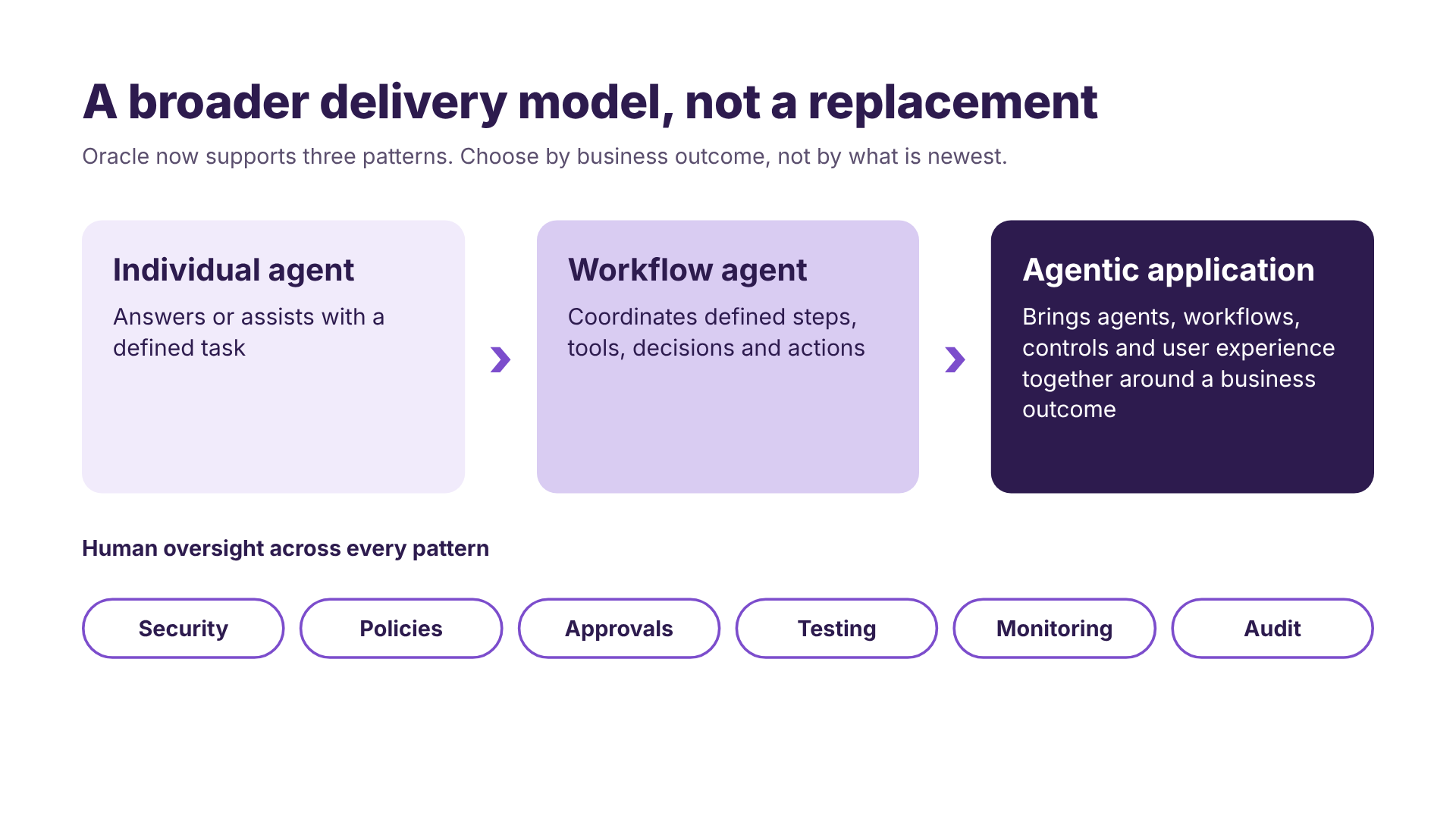
This broader delivery model does not, by itself, mean that every existing agent must be migrated or rebuilt. The right action depends on the specific template, use case and support position. For many use cases the right answer will still be a workflow agent. Not every problem needs an agentic application.
AI is moving into role-based workspaces
In HCM especially, Oracle is placing AI inside workspaces built around a role.
Manager Concierge Workspace (26B) brings workforce insights and actions for managers into one place, with visibility driven by roles and data security.
HCM Professional Activity Center (26C) gives HR users a Redwood workspace for worker search and quick actions, and can call AI agents through guided journeys.
HCM Professional Concierge (26B) is an AI agent for HR professionals. It is a separate capability from the Activity Center, not a renamed version of it.
The practical point: access, navigation and user guidance need to match the experience you are actually deploying.
Check access before assuming functionality has disappeared
A changed user experience can also expose access or role configuration differences. If a user can no longer see part of AI Agent Studio after an update, check the documented roles, privileges and access configuration before concluding that an agent or capability has been removed.
New templates do not necessarily update existing copies
This is the single most useful idea for anyone supporting AI agents in Fusion.
When you copy an Oracle template and publish it, that copy becomes your own configuration to manage.
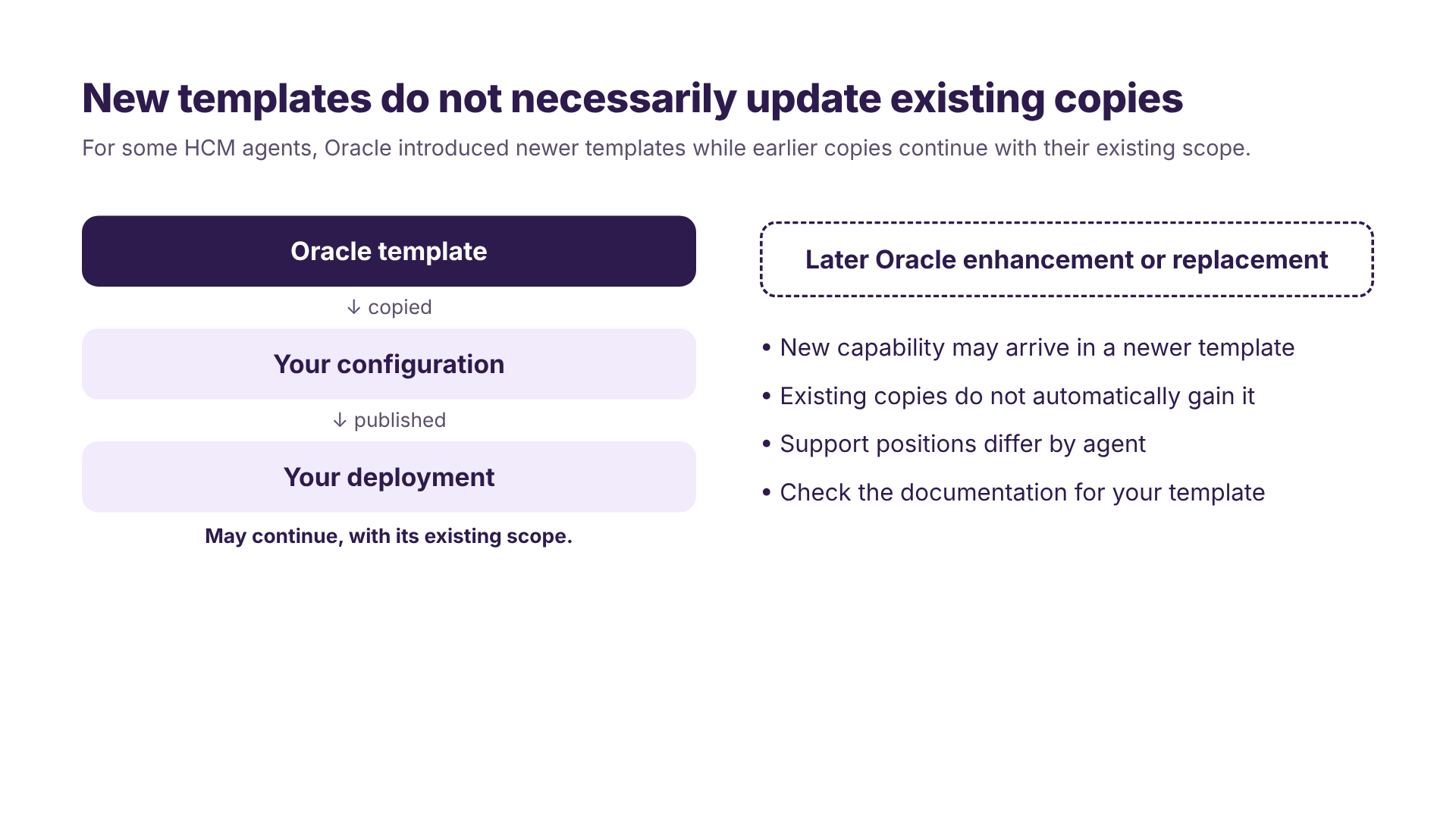
Oracle's 26C notes show this pattern for specific HCM agents. Oracle introduced newer workflow-based templates while allowing copies of earlier agents to continue with their existing scope. Those earlier copies do not automatically gain the capabilities delivered through the newer template.
This will not necessarily apply identically to every agent, so the position should be checked against the Oracle documentation for the specific template involved.
"Still working" and "still current" are two different questions.
Four outcomes, not "keep or rebuild"
The instinct after a big update is to ask whether you need to start again.
None of the Oracle documentation we reviewed says that AI Agent Studio solutions built before 26C must be rebuilt. That doesn't mean nothing needs attention. In our experience, a review of an existing development usually lands in one of four places.
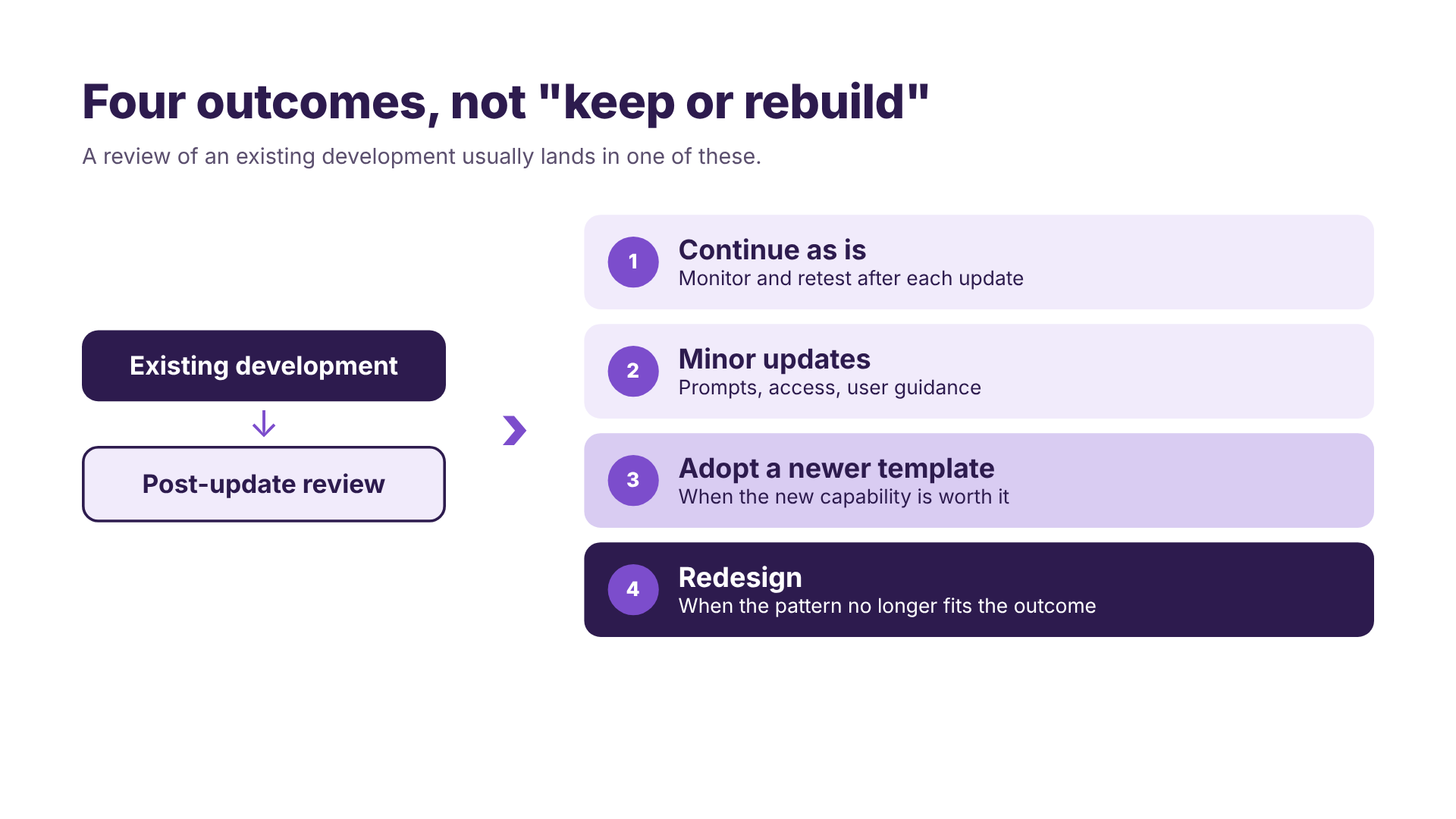
Oracle's newer capabilities do not automatically make earlier solutions wrong. The assessment should focus on business value, supportability and alignment with Oracle's currently documented platform direction, rather than rebuilding simply to use the latest capability.
26D raises the bar on operations
Oracle's published 26D material adds further operational capabilities, including AI Unit budgets with thresholds, notifications and an auto-stop option; CI/CD integration for applications and workflows; model lifecycle controls; ATLAS testing; instruction guardrails; and an AI guidance node. These capabilities should not be assumed to be configured or in use in every environment.
Separately, Oracle announced Fusion Claw on 29 September 2026 as a governed execution runtime for Fusion Agentic Applications, with 25 Claw-powered Fusion Agentic Applications described as available.
The common thread is that AI configuration now needs the same discipline as any other application change: testing with representative user roles, controlled deployment, operational ownership and someone watching consumption. Commercial arrangements for AI Units should always be confirmed directly with Oracle.
Where the impact usually shows up
In practice, the impact may extend beyond the agent itself. Common review areas include:
- Templates copied from Oracle
- Prompt customisations, especially anything built with the now-deprecated AI Configurator
- User guides, support documentation and training material
- The security model and access configuration
- The deployment and testing process
If those haven't been looked at since 26C, that's the place to start.
In summary
The short version is simple: do not assume existing agents are broken, but do not assume they are unaffected. Review each solution against its business value, current support position, security, testing and operational requirements.
Oracle-specific points in this article are based on Oracle's published 26B, 26C and 26D readiness material. Features vary by environment and configuration, so always validate in your own environments.
Oracle sources
- New look and feel, and features for AI Agent Studio (26C)
- Choose How to Create Workflows and Agentic Applications (26C)
- Deprecation of AI Configurator and Transition to AI Agent Studio (26C)
- Manager Concierge Workspace (26B)
- HCM Professional Concierge (26B)
- Introducing HCM Professional Activity Center (26C)
- Manage Positions with AI Assistance (26C)
- Person Data Assistant Workflow Agent Replacing Personal Information Assistant (26C)
- Common Technologies and User Experience What's New, AI Agent Studio features (26D)
- Oracle extends Fusion Agentic Applications with introduction of Fusion Claw (29 September 2026)