


This article is a practitioner‑led perspective on Redwood adoption, focusing on the architectural, behavioural, and operating‑model decisions required to ensure Redwood functions as the primary way HR work is performed.
Redwood is no longer a future‑state concept in Oracle HCM. For most customers, the Redwood experience is already live, while Classic Person Management has been decommissioned (no fixes or enhancements) since 20C.
Yet in many environments, Person Management remains accessible, and HR specialists continue to rely on it as a familiar operational hub.
This creates a common misconception: that Redwood adoption is a matter of enablement. In practice, the challenge is behavioural, driven by design and architectural choices rather than feature gaps.
When legacy navigation remains available, users default to established habits. Organisations seeing the strongest outcomes treat Redwood as a user experience and operating model redesign, proactively steering behaviour toward contextual workflows as coverage continues to expand.
As Redwood coverage continues to progress and intent‑driven interaction becomes a central theme in Oracle’s messaging, many organisations are reassessing what adoption actually requires in practice.
Why Redwood Demands a Different Design Mindset
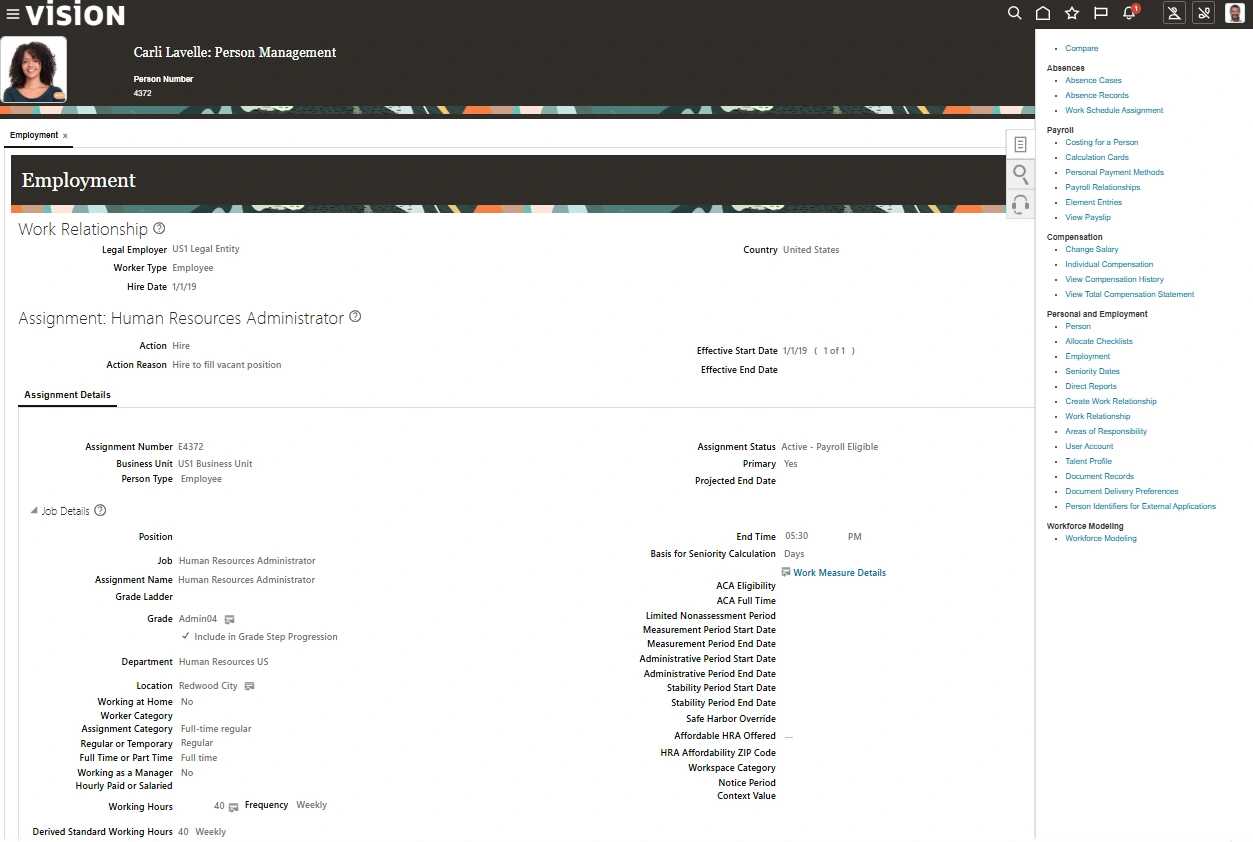
Oracle’s shift to the Redwood user experience has fundamentally changed how HR work is intended to be performed. Many classic pages have already been replaced, and while Oracle has not delivered a Redwood replacement tile for the legacy Person Management app, some organisations continue to expose Person Management through legacy navigation based on configuration choices.
Despite expanding Redwood coverage, Oracle has not signalled intent to deliver a 1:1 replica of Person Management, instead favouring contextual actions, Spotlight, and Activity Center patterns.
This reflects a broader design shift toward a modern, role‑based and context‑driven interaction model.
Historically, Person Management acted as a central operational anchor, combining search, visibility of employment data, and a predictable starting point for transactions. But Redwood is not designed around centralised navigation. Its model prioritises acting within context, guided workflows, and role‑appropriate entry points. When that anchor is no longer positioned as the primary entry point, the natural instinct is to ask:
How do we design an environment aligned to Redwood’s principles, where HR specialists can work confidently without relying on a single legacy page?
Answering that question requires intentional configuration, behavioural design, and architectural discipline.
Swipe horizontally to inspect this figure.
1. Designing for Adoption in a Redwood World
As organisations operate within the Redwood experience, it’s natural for HR teams to assess how the new interaction model supports day‑to‑day responsibilities. HR specialists manage sensitive employee data, compliance‑heavy transactions and time‑critical updates. When a familiar operational page is no longer central, the focus is not on visual change, it is on maintaining confidence, continuity and control.
In practice, HR teams tend to assess Redwood through a small set of pragmatic questions:
- Can we clearly see the complete employment picture?
- Is access to high‑frequency transactions fast and intuitive?
- Does navigation reflect how work is actually carried out?
- Is it clear where and how specific actions should be initiated?
When Redwood is implemented alongside intentional navigation and page design, these concerns are addressed structurally rather than through workarounds or retraining.
2. Systems Readiness as the Foundation for Behavioural Shift
If the objective is to transition users from legacy navigation toward a redesigned Redwood experience, the surrounding configuration must actively support that shift.
Before introducing AI agents or intelligent assistants into a Redwood environment, systems readiness must be assessed thoroughly, not only for technical stability, but for behavioural alignment.
This includes ensuring that:
- Employment data is accurate and consistent.
- Work structures are clear and standardised.
- Security roles are aligned and rationalised.
- Transactions follow consistent, standard processes.
- Legacy configuration inconsistencies are removed.
When organisations attempt to steer users away from legacy hubs without addressing these foundations, confidence erodes. AI amplifies existing fragmentation, making guidance inconsistent and unintentionally reinforcing legacy behaviour.
Redesigning Redwood to support behavioural change is an architectural exercise, and readiness is foundational to adoption.
3. Redesigning Navigation to Steer Behaviour
One of the most powerful levers available in Redwood adoption is menu and navigation design.
In many programmes, particularly those delivered under tight timelines, Redwood is initially enabled on a like‑for‑like basis. Legacy menus are often retained to ensure continuity, with limited opportunity to rationalise navigation or reshape how users access work. While this approach can support go‑live stability, it rarely drives behavioural change. When legacy pathways remain visible, users continue to rely on them. Behaviour does not change through communication alone, it changes through structural cues.
Organisations that see stronger adoption typically treat navigation redesign as a deliberate next phase, using it to actively steer users toward the intended Redwood experience. Practical steps often include:
- Removing or deprioritising classic navigation
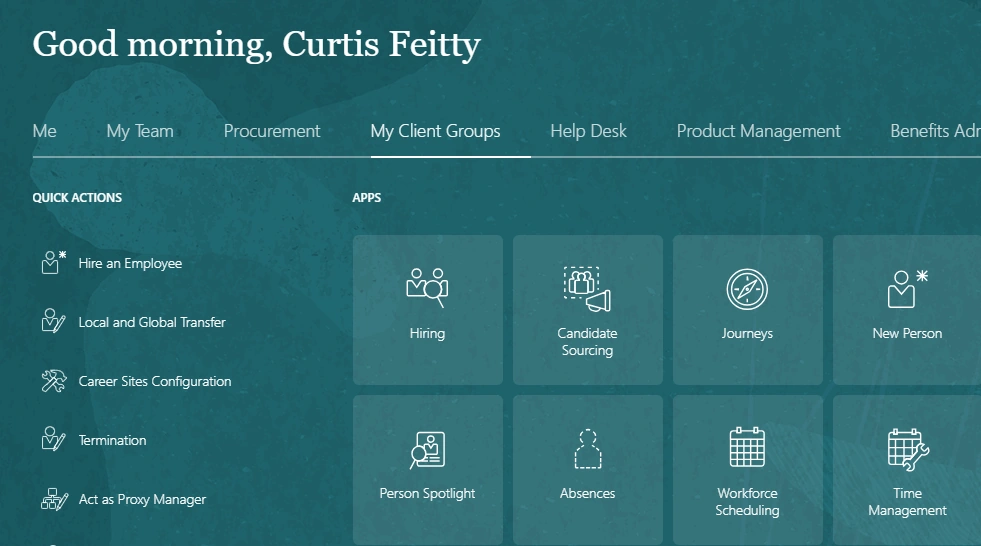
- Promoting Redwood apps and pages in role‑based menus
- Aligning quick actions to core HR workflows
- Reducing clicks for high‑frequency transactions
The objective is not to remove functionality, but to guide behaviour naturally. When navigation is redesigned intentionally, reliance on legacy hubs diminishes without the need for heavy change management.
Swipe horizontally to inspect this figure.
Global Search as an Entry Point: and Its Limits
As Redwood adoption progresses, Global Search is positioned as an alternative starting point for HR work. Used well, they can reduce navigation overhead and help users orient quickly. However, Global Search is not a configurable operational hub in the way Person Management once was.
Search behaviour, result ranking, and action exposure are largely Oracle‑controlled and highly dependent on data quality, security design, and delivered patterns. This means Global Search cannot be relied on as a primary behavioural anchor on its own.
In practice, organisations seeing stronger adoption treat Global Search as a supporting capability, not a substitute for intentional navigation and page design. When Employment Info is optimised and contextual actions are clearly surfaced, search becomes a way to locate context, not a workaround for missing design.
This distinction matters. Without deliberate design elsewhere, Global Search risks reinforcing legacy “find and click” behaviour rather than enabling the intent‑driven interaction Redwood is designed to support.
Person Spotlight as Context, Not an Operational Anchor
Spotlight further supports this model by providing a quick, contextual snapshot when users arrive via search or lists. It helps orient users and surface role‑appropriate actions, but it is not designed to function as a configurable working environment or behavioural anchor.
The overall structure, action prioritisation, and default behaviour of Spotlight remain largely Oracle‑controlled. As a result, its effectiveness depends heavily on upstream design choices, particularly data quality, security alignment, and the clarity of downstream Redwood processes.
In well‑designed environments, Spotlight accelerates orientation. In poorly designed ones, it simply exposes fragmentation more quickly. For this reason, Spotlight works best as a complement to intentional page and navigation design, not a replacement for it.
4. Optimising the Redwood Employment Info Page as the New Operational Anchor
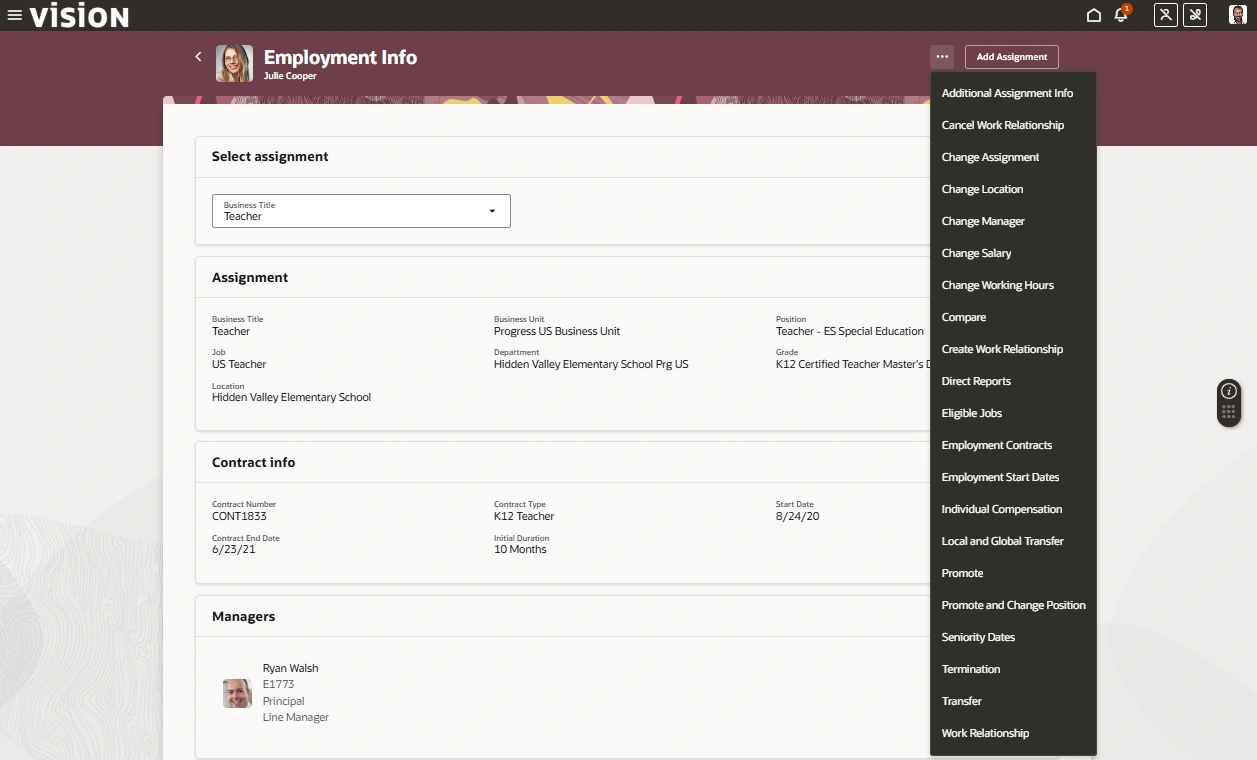
In the absence of a direct Person Management equivalent, Employment Info is a key Redwood page for viewing and initiating employment actions and can be positioned as a primary HR working page through deliberate design and navigation choices.
When enabled with minimal adaptation, Employment Info often fails to surface the data HR specialists rely on most, leading users to revert to familiar legacy hubs. Designed intentionally, however, it can function as a structured, contextual working environment that re‑anchors behaviour without replicating Person Management.
What Can Be Achieved Through Tailored Employment Info Design
When configured deliberately, the Employment Info page can:
- Surface key employment data immediately
- Launch high‑frequency transactions directly from context
- Remove low‑value fields to reduce cognitive load
- Align data visibility to HR roles rather than generic layouts
- Provide embedded guidance for compliance‑sensitive actions
How This Is Achieved in Practice
Optimising Employment Info requires deliberate, workflow‑aligned configuration.
1️⃣ Contextual Actions as the Primary Driver of Work
In Redwood, Employment Info provides context while actions are initiated through Redwood employment processes exposed from the page. The design goal is not to surface every action, but to ensure that:
- Key Redwood processes launch directly from context.
- Contextual actions guide users into the correct flow, reducing reliance on legacy hubs.
2️⃣ Curating Content Within Oracle‑Delivered Page Structures
Employment Info is an Oracle‑delivered Redwood page with a fixed structural backbone, but Visual Builder Studio (Express Mode) enables intentional curation within that structure.
In practice, this typically involves:
- Low‑value fields are hidden to reduce clutter.
- High‑frequency attributes are surfaced for quick validation.
- Visibility is tailored by role, country, or context.
- Reduced scrolling makes the page faster to scan and act from.
Rather than changing how the page is built, this approach changes how it is experienced, making Employment Info feel operationally relevant rather than technically exhaustive.
3️⃣ Reinforcing Workflow Thinking Without Re‑structuring the Page
While Employment Info sections can’t be freely reorganised, workflow alignment can still be achieved through emphasis, visibility, and contextual guidance that mirrors how HR specialists actually work.
For example:
- Core employment context is surfaced for quick validation.
- Assignment‑relevant data is emphasised to support confident decisions.
- Contractual and regulatory indicators are visible at the point of action.
The result is not a re‑engineered page layout, but a page that subtly guides users through decisions in a logical sequence. HR specialists remain within context and progress confidently through the workflow.
4️⃣ Layering Compliance and Guidance Into the Experience
Employment Info reinforces compliance by shaping awareness before actions are initiated, while validation and enforcement occur within governed Redwood processes, approvals, and Guided Journeys.
This layered approach strengthens compliance through context and flow, without reintroducing rigid, centralised control points.
This includes:
- Missing or incomplete data is flagged early through visual indicators.
- Contextual visibility helps users assess issues before acting.
- Employment Info guides users into governed Redwood processes.
Why This Reduces Dependency on Legacy Hubs
Person Management historically functioned as a central starting point, a consolidated search view and transaction launcher that allowed HR specialists to orient themselves before acting.
When Employment Info is contextually complete, action‑enabled, and aligned to real workflows, it becomes a confident operational anchor. Users remain within the flow because the experience is clearer and better aligned to how work is performed.
This is not about removing capability or recreating Person Management in Redwood. It is about reshaping interaction so that:
- Employment Info provides clear, confident context
- Users are guided seamlessly into the correct Redwood processes
- Behaviour is shaped through design rather than reliance on centralised control points
That shift is achieved through:
- Purposeful surfacing of Redwood actions from the right contextual locations
- Targeted content curation using Visual Builder Studio alongside structural redesign
- Workflow‑aware configuration aligned to how HR teams actually operate
- Strong data integrity and governance enforced through Redwood processes and approvals
Redwood provides the interaction framework.Intentional configuration is what makes it usable, reliable, and adopted.
Swipe horizontally to inspect this figure.
5. Using AI Agents with Embedded Deep Links to Reinforce Redwood Behaviour
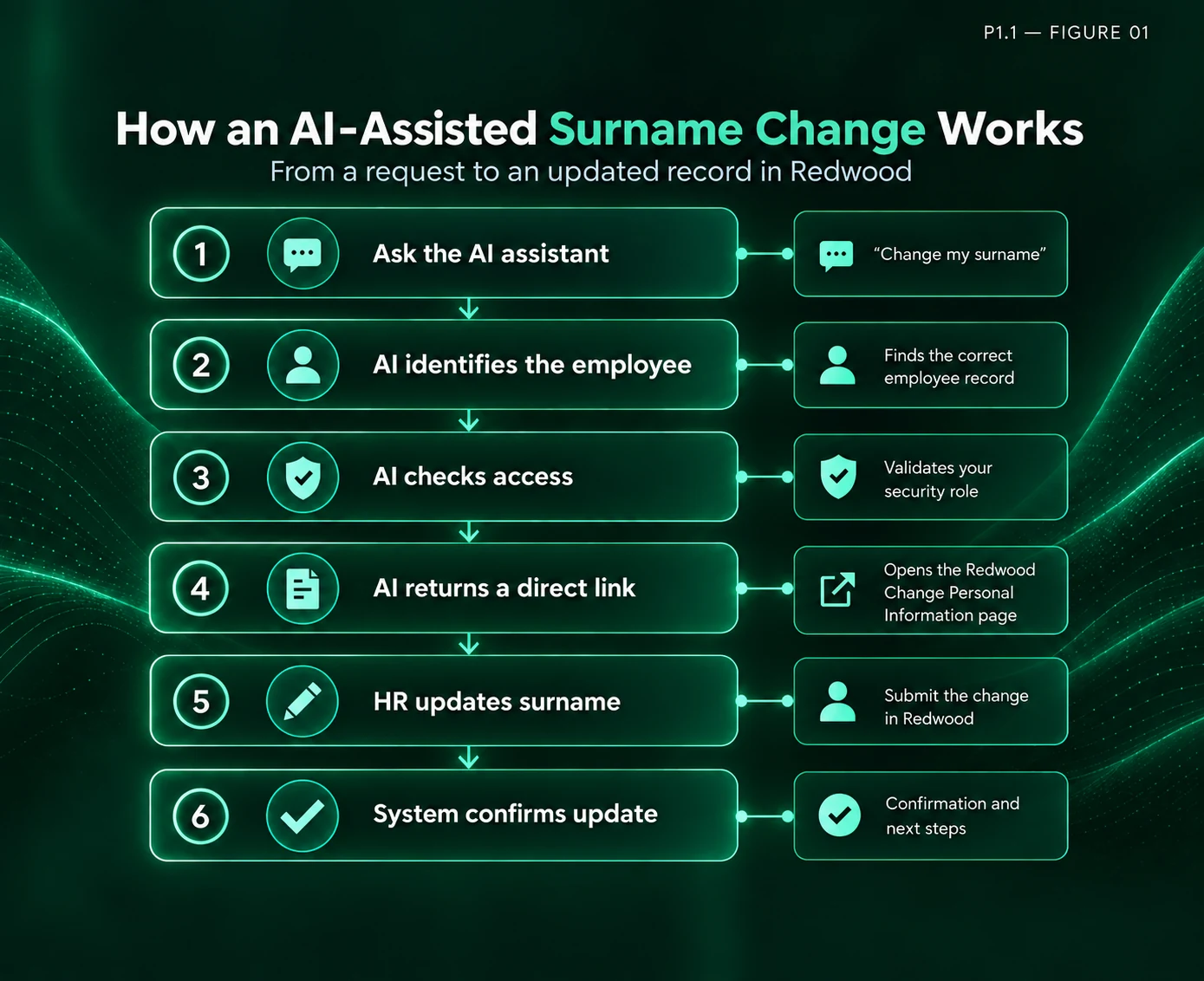
AI agents introduce an additional layer of opportunity, particularly when layered onto a well‑designed Redwood environment. Their real value lies in reducing dependency on legacy navigation by shifting the starting point of work from “search and navigate” to “intent and execute.”
Today, AI‑driven deep linking for HR Specialists exists in a limited but meaningful form, most notably through the Personal Information Assistant (now Person Data Assistant), which allows HR users to securely view and update employee personal data via conversational prompts. Broader HR‑centric agent coverage remains incremental and transaction‑specific, rather than a wholesale replacement for HR navigation.
Oracle’s published roadmap and AI Agent strategy indicate that additional HR‑scoped agents are being delivered incrementally across Core HR and Talent. These agents are designed as role‑specific, transaction‑bound assistants embedded within defined processes, rather than as a general‑purpose replacement for Redwood navigation or the user experience.
What This Looks Like in Practice
Personal Information Assistant (now Person Data Assistant) (26A)
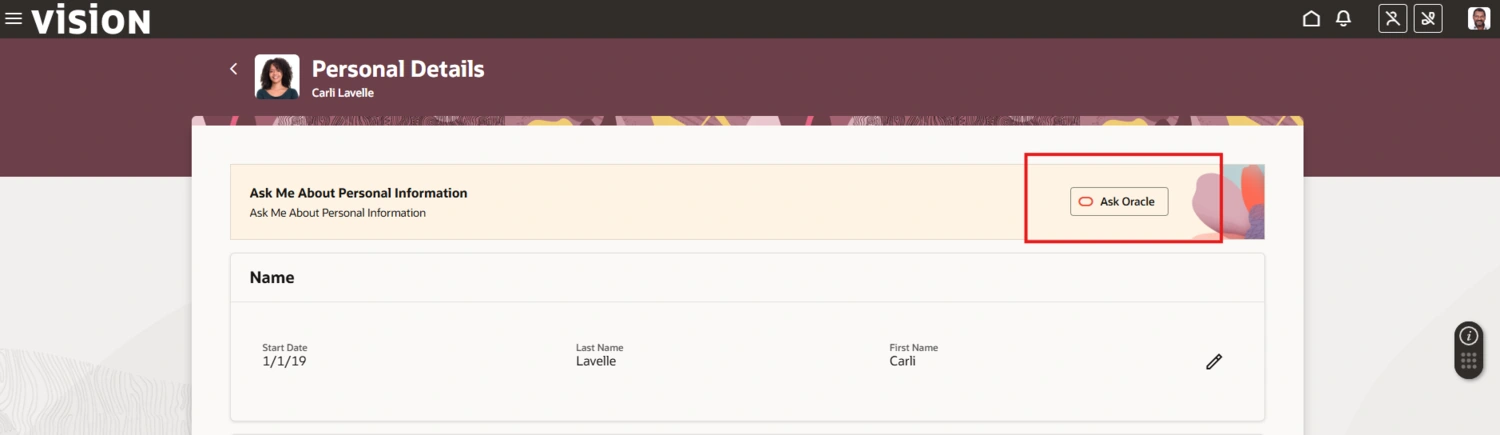
The Personal Information Assistant (now Person Data Assistant) is an AI‑powered, role‑based digital assistant embedded in Oracle Fusion Cloud HCM that enables users to view, verify, and navigate to updates for personal information through natural‑language interaction. Built on Oracle’s AI Agent framework and powered by large language models (LLMs), it allows users to ask conversational questions and receive accurate, context‑aware responses that respect Oracle HCM security controls.
Originally introduced in 25D for employee self‑service, the assistant was expanded in 26A to support Line Managers and HR Specialists who need to view and verify other employees’ personal information, subject to role‑based access control (RBAC).
Person Data Assistant:
- Responds to HR Specialists, not just employees
- Allows HR Specialists to view and verify personal information for other employees, subject to RBAC
- Provides deep links to the pages where HR Specialists can view and update personal information for others
- Supports identification of the target employee by person number, display name, or email
Swipe horizontally to inspect this figure.
Swipe horizontally to inspect this figure.
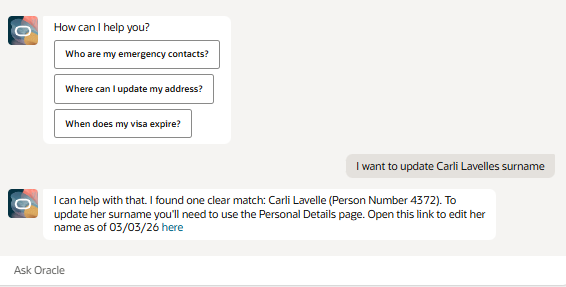
HR Specialist types:
“Update X employee’s surname”
Instead of navigating through multiple pages or searching menus, the HR Specialist is guided to the correct employee context and provided with a deep link into the relevant Redwood transaction, subject to security and configured flows. This reduces the instinct to return to legacy navigation as the starting point for the task.
Swipe horizontally to inspect this figure.
Implementation Considerations
For this to work effectively:
- Deep links must align to stable Redwood flows
- Security roles must be cleanly structured
- Data models must be reliable
- Quick actions must already be rationalised
- Governance boundaries must be defined
AI does not replace structured design. It reinforces it.
Strategic Takeaway
AI agents and deep links are powerful tools for reinforcing Redwood behaviours, but their effectiveness depends on strong foundational design and readiness. They should be integrated as part of a holistic, intentional user experience, not introduced as standalone solutions.
Positioned correctly, AI agents act as behavioural reinforcement mechanisms within a redesigned Redwood experience, guiding users into the right transactions at the right moment. Over time, as key pages and flows are optimised, the legacy instinct to return to Person Management fades, not because access is removed, but because the new pathway is clearer.
How Intentional Redwood Design Changes HR Execution
The absence of a direct Person Management equivalent should not be viewed as a gap to close. It should be viewed as a prompt to redesign deliberately.
In delivery programmes, we commonly see that teams that treat Redwood as a workflow and navigation redesign often report improved consistency and reduced reliance on legacy navigation, including improvements in:
- Adoption consistency across HR teams
- Reduced reliance on legacy navigation
- Greater clarity in high-frequency transactions
- Improved confidence in contextual decision-making
- Stronger readiness for AI-enabled interaction
When Employment Info is structured intentionally, navigation is rationalised and AI deep links are embedded thoughtfully, the need to return to Person Management naturally declines.
Why Redesign Matters
Redwood reflects an intentional shift toward contextual, role‑based, and guided interaction.
Organisations that wait for functional equivalence risk preserving outdated interaction patterns.
Organisations that redesign deliberately position themselves for:
- Cleaner architecture
- Stronger governance
- Intelligent automation
- Sustainable AI adoption
Oracle HCM Beyond Navigation: AI‑Guided Experiences in Redwood for Employees and Managers
In the next article, Oracle HCM Beyond Navigation: AI‑Guided Experiences in Redwood for Employees and Managers, the focus shifts to how employees and managers interact with Oracle HCM when navigation is no longer the primary way work begins.
The article examines how AI‑guided experiences change the entry point into HR tasks, moving users away from menus and search toward intent‑led initiation, where the system guides them into the right Redwood flows at the right moment.
We’ll explore:
- How AI‑guided entry points help employees and managers start work without knowing where to go
- How deep links and intent‑based guidance replace navigation as the primary interaction model
- How guided experiences support execution and decision‑making across everyday HR scenarios
- And why enabling AI for employees and managers requires rethinking interaction patterns, not extending existing navigation structures