The answer is not the sophistication of its language. It is the context it already holds about the person it is talking to.
Article 7 introduced the distinction between information and action, and a framework for understanding how HR AI interactions evolve across four levels of increasing consequence. That framework raised a question worth examining directly: if the same agent can produce such different outcomes depending on the user in front of it, what is actually driving that difference?
Phase 3 began by examining what agents are designed to achieve. This article examines what makes that design effective. Oracle HCM AI agents can determine who the user is through the authenticated Fusion session, without requiring the user to identify themselves during the conversation. What that session context unlocks, through the security model and configured workforce tools, determines whether the interaction feels genuinely useful or merely technically functional.
The Agent Doesn't Need to Ask
Traditional chatbots often begin by asking who you are. Oracle HCM AI agents can determine this from the authenticated session, before the conversation begins.
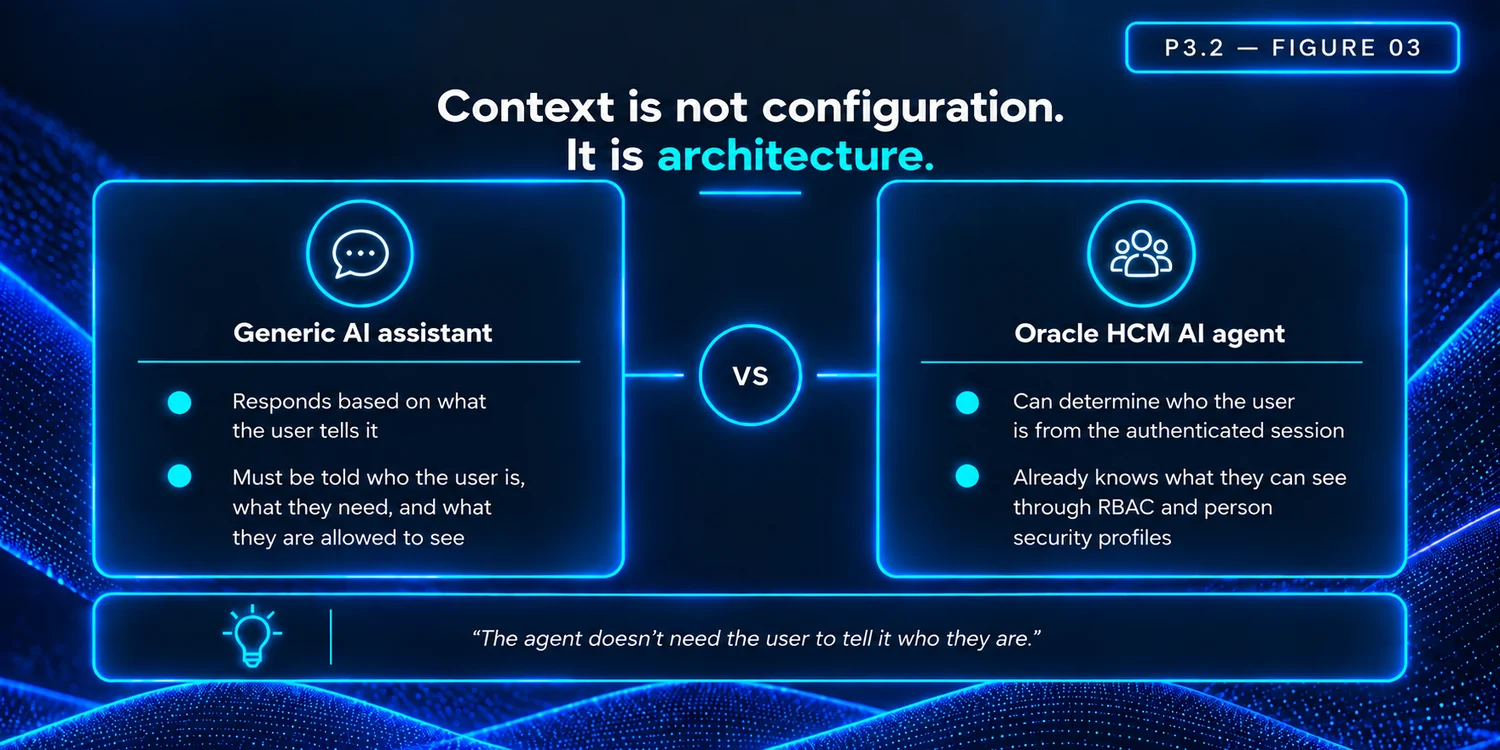
When a user types “show me my payslip” or “what is my compensation information?”, the agent does not need to ask for clarification about who “my” refers to. Oracle provides a seeded user-session capability in AI Agent Studio, the GetUserSession tool, which allows an agent to identify the currently logged-in user through the Fusion HCM session. It returns user identity including person number, name, and email, along with formatting preferences such as date format, number format, and time zone. This session context is established automatically, before the first message is typed.
This might seem like a small thing. In practice it changes the nature of the interaction entirely. The user does not need to establish their identity, explain their role, or provide context that the system already holds. The conversation can begin at the point of the actual question, not at the point of identification.
From that session identity, the agent can then use configured HCM tools and business objects to retrieve the workforce data that the user is authorised to access. This is where the real differentiation begins.
Four Layers of Context
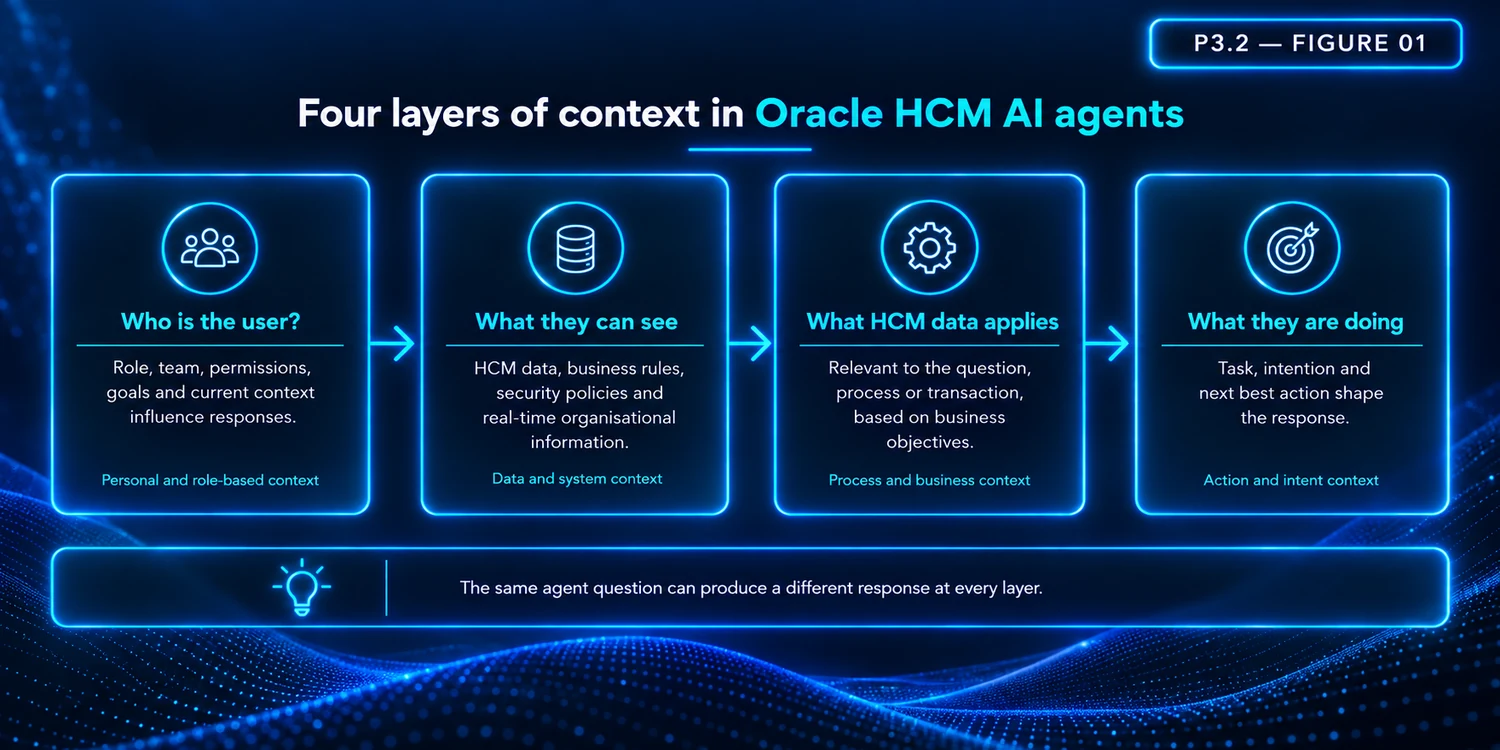
Understanding how Oracle HCM AI agents use context requires thinking across four distinct layers, each building on the one before it.
Swipe horizontally to inspect this figure.
Session Context: Who Is Logged In
The first layer is identity. Oracle's seeded GetUserSession tool retrieves the authenticated user's identity from the security token, person number, name, email, and formatting preferences. Where an agent uses Oracle's seeded user-session capability, it can determine who it is talking to from the Fusion HCM session without requiring the user to identify themselves.
Security Context: What They Can See
The second layer is access. Oracle HCM agents do not create a separate security model. They operate within Fusion HCM's existing role-based access control and person security profiles. In many self-service scenarios, employees are limited to their own data, while managers and HR specialists may have access to a broader population through RBAC and person security profiles. The same question, asked by different users, will be answered differently, not because the agent has been programmed with different rules, but because Oracle's underlying security model determines what each user is permitted to see.
Workforce Context: What HCM Data Applies
The third layer is data. Through configured HCM tools and business objects, an agent can retrieve the specific workforce information relevant to the user's question, absence records, compensation information, personal data, team structure, or employment history. This layer requires configuration: the agent must be set up with the relevant business objects and tools to access particular data domains. But once configured, it allows the agent to draw on the depth of information Oracle HCM already holds rather than relying on generic knowledge sources alone. Exactly which workforce data is available depends on the business objects and tools configured for that particular agent.
Process Context: What They Are Doing
The fourth layer is transactional. Newer Oracle HCM agentic experiences, particularly those introduced in 26A and 26B, are increasingly embedded within specific HR processes and transactions. An agent supporting a promotion process can operate within the context of that HR transaction, helping users complete actions, retrieve relevant information, and navigate the next steps in the process. This is where Oracle's AI capabilities are evolving most rapidly, and where the combination of session, security, and workforce context becomes most consequential.
Why the Same Agent Produces Different Experiences
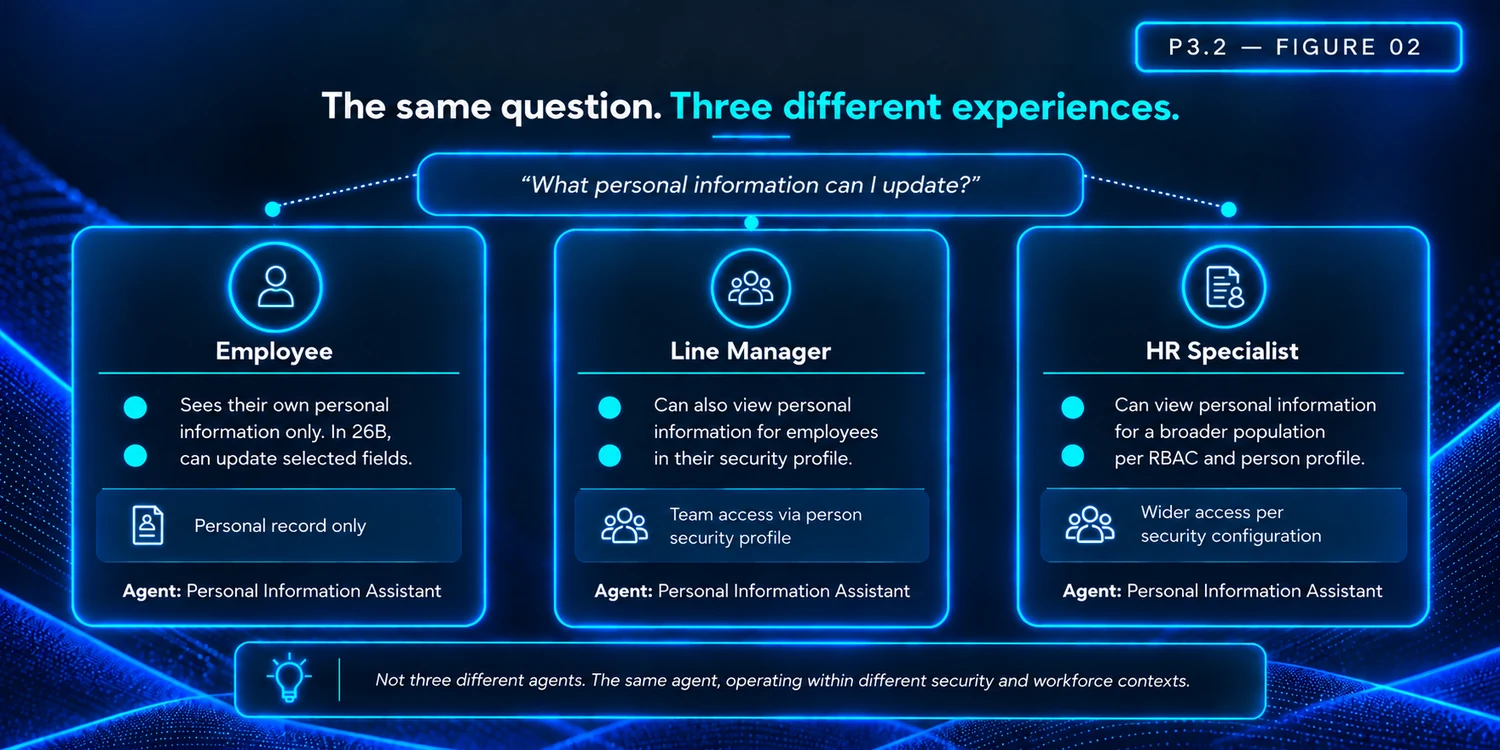
The practical implication of these four layers is straightforward but often underestimated. Where an agent has been designed to support multiple personas, such as the Personal Information Assistant (now Person Data Assistant), an employee, a line manager, and an HR specialist can ask the same question and receive genuinely different responses. Not because different agents have been built for each persona, but because Oracle applies different security and workforce context to each user.
Swipe horizontally to inspect this figure.
Oracle HCM scenario, Personal Information Assistant (now Person Data Assistant)
The Personal Information Assistant (now Person Data Assistant) demonstrates this most clearly, because Oracle's documentation explicitly covers all three personas. An employee asks: “What personal information can I update?” The agent identifies the user through the session, retrieves their own personal record, and responds with the fields they are permitted to view and update. In 26B, employees can create, update, and delete selected personal information directly in the conversation, subject to RBAC and configured approval rules.
A line manager asks the same question. In 26A, Oracle extended Person Data Assistant to allow line managers to view personal information for employees within their person security profile, a capability not available to employees using the same agent for self-service. The session identifies the manager; the person security profile determines whose data they can access.
An HR specialist asks the same question. Their role and configured access permits them to view personal information across a wider population of workers. The question is identical across all three users. The response is shaped entirely by context.
Oracle's 26A enhancement to Person Data Assistant is a practical example of this principle: the same agent template was expanded from employee self-service to manager and HR specialist use cases, with security context determining the scope of the response.
Oracle HCM scenario: Compensation Advisor
The Compensation Advisor (My Team) illustrates a different dimension of context: authenticated session combined with organisational hierarchy. Compensation Advisor (My Team), which Oracle lists as one of the agents that uses the GetUserSession pattern, identifies the logged-in user and then applies their reporting structure to scope what compensation information is accessible. A manager asking about salary grades for their team receives information only for workers within their reporting hierarchy, not because the agent has been given special permissions, but because Oracle's RBAC model and person security profile govern the scope of their access. The same session-plus-security pattern applies; the agent is simply scoped to a different persona and use case.
What This Means for Agent Design
Understanding the four context layers changes how organisations should think about designing and deploying Oracle HCM AI agents. The temptation is often to build separate agents for each user type, an employee agent, a manager agent, an HR agent. In many cases, Oracle's security model makes that unnecessary. Where an agent has been designed to support multiple personas, Oracle's security model can do much of the differentiation work, because the context itself shapes the response.
This also means that agent quality is not just a function of how well it has been prompted or how much knowledge it holds. It is a function of how well the underlying security model has been configured, how accurately person security profiles reflect organisational reporting lines and access boundaries, and whether the configured HCM business objects give the agent access to the right data for each user type.
One caveat worth noting: Oracle's documentation explicitly states that RBAC is honoured, but that some localisation rules and Visual Builder Studio business rules may not be automatically enforced by the agent. Where organisations have used VBS to hide specific fields or apply custom business rules, prompt guardrails and tool scoping may be needed to ensure the agent's responses align with those configurations. Context is powerful, but it is not the same as complete business-rule enforcement.
The value of an Oracle HCM AI agent does not come primarily from its language capability. It comes from the context it operates within, the authenticated session that establishes who is talking, the security model that determines what they can see, the configured workforce tools that retrieve relevant data, and the process context that provides the relevant actions, information and workflow steps.
Where an agent is designed to support multiple personas, as Person Data Assistant demonstrates, an employee, a line manager, and an HR specialist are not three different problems requiring three different agents. They are three different contexts within the same Oracle HCM platform. The context Oracle already holds is what makes each interaction appropriate to the person receiving it.
Swipe horizontally to inspect this figure.
In the Next Post
In the next article, Understanding Oracle AI Agents: Knowing When to Act, the focus shifts to the judgement layer of agent design.
Article 7 explored what agents are designed to do. Article 8 examined how they know who they are helping. Article 9 addresses the next question: once an agent understands the user and their context, how does it decide whether to answer, guide, initiate a transaction, or hand control back to a human?
Oracle AI Agents Discussed in This Article